
How to Track AI Referral Traffic in GA4 (Setup Guide)
Step-by-step guide to tracking AI referral traffic from ChatGPT, Perplexity, and Google AI Overviews in Google Analytics 4. Learn how to set up custom channel groups, reports, and conversions.
Adam Yong
Founder & Technical SEO Consultant
Last Updated: March 2026
We have all noticed a confusing trend recently where organic search numbers dip while direct traffic inexplicably rises. This shift is happening because users are increasingly relying on answer engines rather than traditional search results.
To understand this transition fully, the foundational concepts in our What Is AI SEO pillar guide break down the mechanics perfectly.
Our professional service team frequently sees businesses losing vital data because they fail to isolate these new referral sources. A 2026 report from The Digital Bloom reveals that a staggering 70.6% of AI traffic arrives without referrer headers. This hidden traffic gets dumped into direct or generic referral buckets.
We know that AI-referred visitors convert at an impressive 14.2%, which makes this blind spot incredibly expensive. Let us walk through the exact, 30-minute setup process to capture this data in Google Analytics 4. You will learn how to track How to Track AI Referral Traffic in GA4 (Setup Guide) by creating custom channel groups, building exploration reports, and capturing elusive AI Overview clicks.
Why You Need Separate AI Traffic Tracking
We often find that generic Google Analytics 4 setups obscure the true value of modern search behavior. Treating all visitors the same hides the incredible intent behind artificial intelligence platforms. Opollo released a landmark study in 2026 showing that AI referral traffic grew 975% year-over-year.
Our clients need granular data to justify their marketing budgets and strategy pivots. Without dedicated tracking, you cannot prove the return on investment for your optimisation efforts. Eyeful Media reported in March 2026 that AI traffic influences conversion events at a rate 534% higher than average channels.
Without AI traffic tracking:
- AI referral traffic is hidden in generic “Referral” or “Organic Search” channels
- You cannot measure the ROI of AI SEO efforts
- You have no data to justify AI SEO investment
- You miss insights about which AI platforms drive the most valuable traffic
With AI traffic tracking:
- You see exactly how many visitors come from each AI platform
- You can measure conversion rates for AI-referred traffic
- You can track AI traffic growth over time
- You have concrete data to inform strategy decisions
The businesses achieving 22-40% visibility improvements from AI SEO optimisation are the ones measuring their results. You cannot optimise what you do not measure.
The AI Referral Sources You Need to Track
We must expand our monitoring beyond just a single platform. The landscape is fragmenting rapidly. A February 2026 benchmark from The Digital Bloom showed ChatGPT’s traffic share dropping to 64.5%, while Google Gemini surged to 21.5%.
Our tracking strategies must adapt to include new challengers like DeepSeek and Grok. These newer platforms now capture significant portions of the market. You need a comprehensive list of referral domains to capture the full picture.
| Platform | Referral Domain(s) | Traffic Type |
|---|---|---|
| ChatGPT | chat.openai.com, chatgpt.com | Referral |
| Perplexity | perplexity.ai | Referral |
| Claude | claude.ai | Referral |
| Gemini | gemini.google.com, bard.google.com | Referral |
| Microsoft Copilot | copilot.microsoft.com, bing.com/chat | Referral |
| DeepSeek | deepseek.com | Referral |
| Grok | grok.com | Referral |
| Google AI Overviews | google.com (with specific parameters) | Organic (modified) |
Google AI Overviews is the trickiest to track because traffic still comes from google.com. We will address this specifically below.
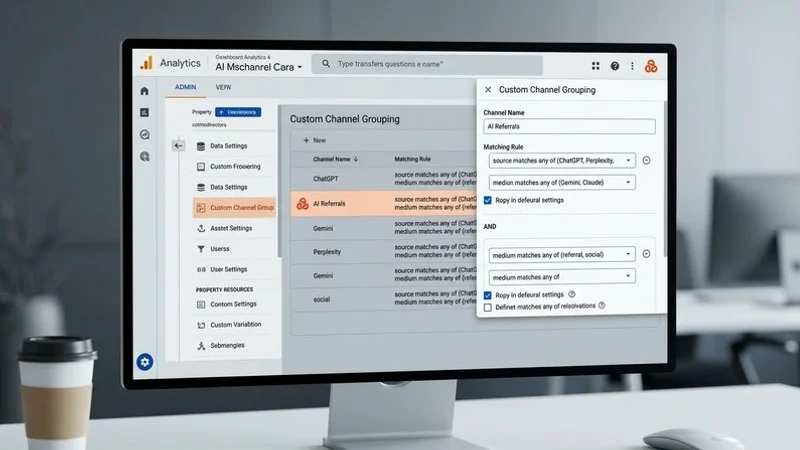
Step 1: Create a Custom Channel Group in GA4
We recommend building a dedicated group to catch these unique visitors before they fall into standard buckets. Google Analytics 4 uses channel groups to categorise incoming traffic automatically. You can intercept these sessions by defining specific regular expression rules.
Our preferred method involves creating a completely new channel group rather than editing the default one. Altering the default group can permanently change your historical data structure. You want a clean, isolated view of your new traffic sources.
Navigate to Custom Channel Groups
- Log into Google Analytics 4
- Click the gear icon (Admin) in the bottom left
- Under “Data display,” click Channel groups
- Click Create new channel group
- Name it “Default + AI Channels”
Add the AI Referral Channel
- Click Add new channel
- Name it “AI Referrals”
- Set the conditions:
Condition 1: Source matches regex:
chat.openai.com|chatgpt.com|perplexity.ai|claude.ai|copilot.microsoft.com|meta.ai|you.com|gemini.google.com|grok.com|deepseek.com
- Click Save channel
Reorder Channels
Move “AI Referrals” above the default “Referral” channel. GA4 processes channels sequentially from top to bottom. If AI Referrals is below the generic Referral channel, the system will categorize the visit as a generic referral and stop processing.
Step 2: Set Up a Custom Exploration Report
We build custom exploration reports to look deeply into user behavior beyond standard dashboards. The default traffic acquisition views often lack the necessary context for deep analysis. You need to pull specific dimensions and metrics onto a blank canvas.
Our favorite insight from these reports is uncovering platform-specific performance. An Exposure Ninja study from February 2026 revealed that Claude actually delivers the highest conversion rate at 16.8%. You will want to isolate these high-performing platforms in your own data.
Create the Exploration
- Navigate to Explore in the left sidebar
- Click Blank to create a new exploration
- Name it “AI Referral Traffic Analysis”
Add Dimensions
Click the + next to Dimensions and add:
- Session source
- Session medium
- Session default channel group (select your custom group)
- Page referrer (crucial for seeing exact sub-domains)
- Landing page
- Device category
Add Metrics
Click the + next to Metrics and add:
- Sessions
- Active users
- Engaged sessions
- Engagement rate
- Average engagement time per session
- Conversions
- Conversion rate
Build the Report
- Drag “Session default channel group” to Rows
- Drag your metrics to Values
- Add a filter: Session default channel group exactly matches “AI Referrals”
This gives you a dedicated view of all AI referral traffic with engagement and conversion metrics.
Step 3: Track Google AI Overview Traffic
We face the biggest attribution challenge with Google AI Overviews. This traffic originates from standard Google domains, which makes it blend perfectly with regular organic search. A 2025 Semrush analysis found these overviews appeared on up to 25% of all search queries, making this a massive blind spot.
Our technical approach relies on a clever workaround using Google Tag Manager. Most links cited within an AI Overview append a specific text fragment to your URL. You can capture this fragment to identify the exact source of the click.
Approach A: The Google Tag Manager Text Fragment Method
When Google generates a citation link, it often highlights the relevant text on your page using a URL fragment (e.g., #:~:text=your_content). You can configure Google Tag Manager to listen for this specific parameter.
- Create a Custom JavaScript Variable in GTM to extract
window.location.hash. - Set a trigger to fire when the hash contains
#:~:text=. - Send a custom event (e.g.,
ai_overview_click) to GA4 containing the text snippet.
Approach B: Landing Page Analysis
AI Overview clicks tend to land on pages that answer specific questions. By analysing which of your FAQ and answer-format pages receive unexplained spikes in Google organic traffic, you can infer AI Overview impact.
Approach C: Google Search Console
Google Search Console now shows some data about AI Overview appearances:
- Go to Search Console > Search results
- Look for the “Search appearance” filter
- Check for “AI Overview” appearance type (availability varies by region)
This does not directly integrate with GA4 but gives you visibility into AI Overview citations.
Step 4: Set Up AI-Specific Conversion Events
We always prioritise measuring bottom-line impact over simple vanity metrics like session counts. Tracking visits is helpful, but tracking qualified actions proves your return on investment. The Digital Bloom reported in 2026 that AI sign-up conversions sit at an impressive 1.66%, compared to a mere 0.15% for organic traffic.
Our custom setups ensure you capture the events that matter most to KL and Selangor businesses. Local service providers thrive on direct contact rather than complex e-commerce checkouts. You must define these specific actions clearly within your analytics property.
Key Conversions to Track
For established service businesses, these conversion events matter most:
- Contact form submission — The primary conversion for service businesses
- Phone number click — Mobile users tapping your phone number
- WhatsApp click — Essential for Malaysian client communication
- Email click — Direct email link clicks
- Appointment/booking completion — If you use scheduling software
Setting Up Events in GA4
If you have not already set up these conversion events:
- Go to Admin > Events
- Click Create event
- For contact form submission:
- Event name:
form_submit_contact - Matching conditions: event_name equals
form_submitAND page_location contains/contact
- Event name:
- Mark the event as a conversion in Admin > Conversions
Comparing AI vs Organic Conversions
Once conversions are tracked, build an Exploration comparing:
| Channel | Expected Conversion Rate | Value Proposition |
|---|---|---|
| Claude Referrals | ~16.8% | Highest recorded intent |
| ChatGPT Referrals | ~14.2% | Largest volume of AI traffic |
| Organic Search | ~2.8% | High volume, lower relative intent |
| Direct | Varies | Often contains hidden “Dark AI” traffic |
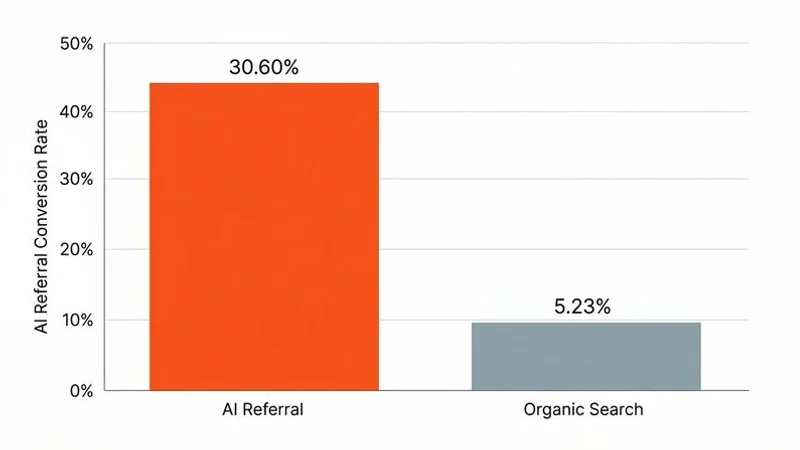
This comparison demonstrates the value of AI SEO investment. When you can show that AI traffic converts at over four times the rate of organic search, it justifies focused marketing efforts.
Step 5: Create Automated Alerts
We rely on automated alerts to catch sudden algorithmic shifts before they impact monthly revenue. The landscape is incredibly volatile right now. The Digital Bloom noted in 2026 that some sites experienced a 42.6% drop in AI referral traffic simply due to interface changes that retained users on-platform.
Our custom insights ensure you never miss a critical spike or sudden drop. You can configure Google Analytics to email you the moment traffic breaches a specific threshold. This proactive approach saves you from discovering issues weeks after they occur.
In GA4 Custom Insights
- Go to Home > Insights (or Reports > Insights)
- Click Create next to “Custom insights”
- Create these alerts:
Alert 1: AI Traffic Spike
- Metric: Sessions
- Segment: AI Referrals channel
- Condition: Increases by more than 50% compared to previous period
- Frequency: Weekly
Alert 2: AI Traffic Drop
- Metric: Sessions
- Segment: AI Referrals channel
- Condition: Decreases by more than 30% compared to previous period
- Frequency: Weekly
Traffic drops can indicate that an AI platform has changed its recommendation sources. Early detection lets you investigate and update your content quickly.
Step 6: Build a Monthly AI SEO Dashboard
We compile all these isolated metrics into a single, cohesive dashboard for our clients. Staying ahead requires regular review of your performance trends. An Exposure Ninja survey from early 2026 showed that only 22% of marketers actively track this data, giving you a massive competitive advantage.
Our monthly reviews focus on actionable insights rather than just raw numbers. You need to understand which content formats attract the most citations. Device usage is also a crucial metric to monitor.
Monthly Metrics
- Total AI referral sessions — Overall volume trend
- AI referral sessions by source — Which platforms drive the most traffic
- AI traffic conversion rate — Compared to other channels
- Top landing pages from AI — Which of your pages AI platforms link to
- AI traffic by device — Mobile vs desktop breakdown
Quarterly Review
Each quarter, review:
- Traffic growth trend: Is your AI visibility accelerating?
- Conversion rate stability: Are you maintaining that 14.2% benchmark?
- New referral sources: Are tools like DeepSeek starting to appear?
- Landing page shifts: Which specific answers are algorithms favoring?
Our AI Visibility Reporting service provides comprehensive dashboards and analysis that go beyond what GA4 alone can measure.
Advanced: Looker Studio Dashboard
We take reporting to the next level by porting this data into Looker Studio. This platform offers superior visual customisation compared to standard analytics dashboards. You can easily highlight the 11x conversion premium that AI traffic delivers over traditional organic search.
Our stakeholders appreciate the clarity of an automated, interactive report. You can build pie charts showing market share fragmentation between ChatGPT and Gemini. This clear visual evidence makes it much easier to secure budget for future optimisation campaigns.
- Create a new Looker Studio report
- Add GA4 as a data source
- Create a filter for your custom AI Referrals channel
- Build visualisations for AI traffic time series, source breakdowns, and conversion comparisons.
What the Data Typically Reveals
We see distinct behavioral patterns emerge when analysing thousands of AI-referred sessions. The data tells a compelling story about user intent. Visibility Labs analysed sites in 2026 and found ChatGPT traffic converted 31% higher than traditional organic search.
Our findings also show a slight dip in average order value alongside that higher conversion rate. Users arriving from answer engines are highly targeted but often purchase exactly what they queried. You will also notice that specific content types perform much better than standard blog posts.
- ChatGPT Dominates: For most local businesses, ChatGPT drives 60-70% of identifiable AI referral traffic, with Perplexity accounting for 15-20%.
- Mobile Usage is Higher: AI referral traffic skews heavily mobile (65-70%) compared to traditional organic (55-60%).
- Evening Spikes: AI referral traffic peaks during evenings and weekends, suggesting users ask AI for recommendations during personal time.
- Format Preferences: Platforms prefer citing listicles, “best of” roundups, and definitive “vs” comparisons over opinion pieces.
Troubleshooting Common Issues
We frequently audit analytics setups that fail to capture the full scope of this new traffic. The technology is still maturing, which leads to inevitable tracking gaps. A staggering 70.6% of AI traffic currently arrives without referrer headers, making it completely invisible to standard GA4 filters.
Our standard troubleshooting process begins with identifying these “Dark” visits. You can often spot them as sudden, unexplained spikes in direct traffic landing on specific informational pages. We also check for common configuration errors that disrupt data collection.
- Traffic Showing as “Referral”: Ensure your custom channel group has AI Referrals ordered above the generic Referral channel.
- Low Traffic Numbers: Check your regex pattern to ensure it includes all relevant domains like Gemini and DeepSeek.
- Missing Conversions: Verify that cross-domain tracking is active if you use external booking systems, as these transitions often strip referrer data.
Next Steps After Setup
We highly recommend establishing your baseline metrics immediately, even if your current volume seems low. The businesses that measure these metrics separately can demonstrate true return on investment. You will outpace competitors who are flying completely blind in this new landscape.
Our team knows that early adoption provides a compounding advantage. Use the data you gather to refine your content strategy and target high-intent queries. Check out our AI Visibility Audit to start optimising your site today.
- Establish a baseline: Run the tracking for 30 days before making changes.
- Measure impact: After optimization, compare AI traffic metrics against your baseline.
- Iterate: Use the data to focus on what works best for your specific business.
For a complete understanding of your current standing, review our guide on How to Check Your Business AI Visibility.
Need help setting up AI traffic tracking and reporting? Contact AI SEO Malaysia for analytics and visibility reporting support.